Banner

Showing posts with label Jailbreak. Show all posts

Saturday, April 9, 2011

Bugs Fixing Using Redsn0w 0.9.6rc12 4.3.1 Untethered Released

  • iPhone dev-team has just updated Redsn0w to version 0.9.6rc12 to jailbreak iOS 4.3.1 on iPhone, iPod touch and iPad. Redsn0w 0.9.6rc12 should fix any lingering issues with the boot animation.
  • The official change on the Redsn0w 0.9.6rc12:
Those running redsn0w may have noticed we enabled too many Settings options in some versions of the jailbreak (for instance, what you want your side switch to do, even if you have no side switch because you’re not using an iPad). Release rc10 rc12 of redsn0w corrects that (you can just run it over your existing jailbreak…be sure to de-select Cydia to avoid package conflicts).
  • Along the way, we’ve also added the option to enable boot animations…these animations can be installed via Cydia, but be sure to select which animation to use via the Settings->Bootlogo setting after you’ve downloaded an animation (and again, you can just run rc10 rc12 over your existing jailbreak…be sure to de-select Cydia to avoid package conflicts).
  • (The boot animation we tested against was “Android Boot Logo”. It correctly installs all the dependencies needed to run the animation at each boot).
  • You can follow our previous guide posted here to jailbreak iOS 4.3.1 on your iPhone, iPod touch or iPad for Windows and Mac.
  • Note: for who rely on ultrasn0w unlock please stay away from Redsn0w and iOS 4.3.1 until the dev-team fix the ultrasn0w on iOS 4.3.1.
Download Redsn0w 0.9.6rc12 (Windows)
Download Redsn0w 0.9.6rc12 (Mac)
Download iOS 4.3.1 for iPhone, iPad and iPod touch
Download iTunes 10.2.1 for Windows / Mac OS X

[Source: Redsn0w 0.9.6rc12 4.3.1 Untethered Released with Bugs Fixing]

Monday, March 7, 2011

[HOW-TO] - Jailbreak iPod touch 4G / 3G on iOS 4.3 GM Using PwnageTool (Tethered JB)

  • Can’t wait to Jailbreak your iPod Touch iOS 4.3?
  • Wait no more... if you are willing to Jailbreak in a more slightly difficult than the normal Pwnage Tool, you can use the method below.
iOS developer and hacker iH8sn0w and jcf_dev have released PwnageTool bundles to jailbreak iOS 4.3 GM on iPhone, iPad and iPod touch. You can use these bundles with PwnageTool 4.2 to create custom jailbroken 4.3 firmware files.
Jailbreak-iPod-touch-4G-on-iOS-4.3-2011-03-7-21-29.jpg
Unfortunately though, this is a tethered jailbreak, which means you will need to restart your iPod touch in a tethered-jailbroken mode on every reboot using tetheredboot utility.
We have already covered extensive tutorials on how-to jailbreak iPhone and iPad on iOS 4.3. The instructions for both iPod touch 4G and 3G are exactly same as the ones for iPad. You can follow the instructions posted here, with some changes as explained below.
  • On Step 3, download iPod4,1_4.3_8F190.bundle file and move it to the location as mentioned in the instructions.
  • On Step 5, select “iPod touch 3G, 4G” option when PwnageTool prompts to select your device.
  • On Step 6, browse for iOS 4.3 GM for iPod touch 4G or 3G.. duh
  • On Step 13, use kernelcache.release.n81 and iBSS.n81ap.RELEASE.dfu instead of kernelcache.release.k48 and iBSS.k48ap.RELEASE.dfu
  • On Step 14, use the following commands in Terminal:
/Users/Edoras/Downloads/tetheredboot/tetheredboot 
/Users/Edoras/Downloads/tetheredboot/iBSS.k48ap.RELEASE.dfu 
/Users/Edoras/Downloads/tetheredboot/kernelcache.release.k48
Download iOS 4.3 GM for iPod touch 4G / 3G
Download iTunes 10.2
Download PwnageTool 4.2 

Download iOS 4.3 PwnageTool Bundle for iPod touch 4G 

Download iOS 4.3 PwnageTool Bundle for iPod touch 3G
Full details: HERE

Sunday, February 13, 2011

[HOW-TO] - Use GreenPois0n RC6 to Jailbreak Apple TV 2 (ATV2)

  • Another kudos to awesome effort of Chronic Dev Team!
  • Finally the Jailbreak for Apple TV 2 has been release by the fantastic Chronic Dev Team! When the team release GreenPois0n RC5, it did not support Apple TV2. 
  • Greenpois0n RC6 now available for both Windows & Mac machines that untethers Apple TV 2G jailbreak on iOS 4.2.1.
To be able to untether iOS 4.2.1 on Apple TV 2G, you have to follow the step by step guide posted here or here and you'll get Apple TV 2G untethered jailbroken on iOS 4.2.1. 

STEP 1: Your device must be on iOS 4.2.1, then download GreenPois0n RC6 for Mac OS X

STEP 2: Launch GreenPois0n RC6 then connect your ATV2 into your Mac via USB and click on Jailbreak as shown below:
 

STEP 3: Follow the instructions shown on the screen to enter DFU mode:
 

STEP 4: Once jailbroken, you'll get Cydia installed on your iOS device and you won't need to use Just tethered boot right now option anymore.


Download links of greenpois0n RC6 below:

Download Greenpois0n RC6 for Mac OS X
Download Greenpois0n RC6 for Windows
Download iOS 4.2.1 for Apple TV 2G

You can follow us on Twitter and Edoras FotoZine Blog.


Friday, February 4, 2011

HOW TO: Untethered Jailbreak Using GreenPois0n RC5 for iOS 4.2.1

Greenpois0n 1.0 RC5 ***
Description of the software:
  greenpois0n will Jailbreak your iDevice.
Supported iDevices:
  - iPod Touch 2G (all bootroms)
  - iPod Touch 3G
  - iPod Touch 4G
  - iPad 1G
  - iPhone 3Gs (all bootroms)
  - iPhone 4
  - iPhone 4 Verizon (_not_tested_)
  - AppleTV 2
Requirements (check this !)
  - A supported device (see above)
  - The device should run iOS 4.2.1. Please check on the device in the Settings -> General -> About page.
    If your device is running an older version, please upgrade iOS first using iTunes.
    *** If you want to SIM Unlock, preserve your baseband using TinyUmbrella ¬®***
  - at least MacOSX 10.5
Notes (checks this also !)
  - If your device is jailbroken with iPhone Dev Team's Monte, please restore to fresh 4.2.1. first
  - If Cydia doesn't show up after Loader, you may need to reboot the device
  -This version of greenpois0n doesn't include a patched activation system. You'll need to activate your device using iTunes
  - WE DO NOT SUPPORT PIRACY !
Instructions
  1.     Plug the device to your computer using the USB cable
  2.     Quit iTunes if it shows up
  3.     Start greenpois0n.app
  4.     Follow instructions
  5.     The device will boot a 1st time with verbose text on screen. This operation will install the jailbreak on the device.
  6.     The device will reboot normally
  7.     Start the Loader application (green icon on the SpringBoard), and follow instructions to install Cydia

Tuesday, February 16, 2010

[HOW-TO] - How to Jailbreak Your iPhone 3GS Using PwnageTool [Mac]

This tutorial will show you how to jailbreak your iPhone 3GS using PwnageTool for Mac. PwnageTool now supports the latest 3.1.3 firmware.

Source from iClarified --> How to Jailbreak Your iPhone 3GS Using PwnageTool [Mac]

Saturday, February 13, 2010

Un-tethered vs Tethered Jailbreak


If you have any questions regarding what a Tethered or Un-tethered jailbreak means, please read this first before posting any questions.

Tethered Jailbreak:

A tethered jailbreak ONLY applies to the iPhone 3GS and not all of them.

NOTE: I received an update that some iPod Touch2G and 3G require a tethered jailbreak, too. The serial number trick may or may not be in effect (I have not tested it), but the logic and practice is the same.

A tethered jailbreak means that once your iPhone is successfully jailbroken with blackra1n, you'll need to connect
your iPhone to your computer if you ever need to reboot your iPhone or your iPhone loses battery charge.

What you'll see when you reboot your iPhone (if you're tethered) is the
iTunes and USB picture. Once you get this, simply open up blackra1n and press "Make It Ra1n." This WILL NOT re-jailbreak or restore your iPhone, all it is doing is booting back up your iPhone for you.

You will require a tethered jailbreak if you have the
NEW bootrom version. The OLD iBoot version was 359.3 and the NEW version is iBoot 359.3.2. There are a few methods to check which iBoot version you have.

Method 1 (Serial Number Method):

You can get a very good idea if your iPhone requires a tethered jailbreak by looking at the 3rd, 4th and 5th numbers in your serial number. If your serial number digits are "
939" OR LOWER, you're safe. If you're serial number digits are "940" or HIGHER, you run a high chance that your iPhone will require a tethered jailbreak.

Some people are reporting that they've been able to successfully jailbreak without having a tethered jailbreak with a serial number of 940 and higher. While this is rare, it apparently is happening.

Method 2 (Using DFU Mode):

Windows:

1. Put your iPhone into DFU Mode
2. Right Click on My Computer > Properties > Hardware (tab) > Device Manager
3. Select the plus arrow for "Universal Serial Bus (USB) Controller"
4. Find "
Apple Mobile Device USB Driver", right click and select Properties
5. Go to "Details" and find "Device Instance ID"
6. Scroll through the string and you'll eventually find the bootrom version (iBoot)
7. If it's 359.3 you
DO NOT require a tethered jailbreak. If it's 359.3.2 you DO require a tethered jailbreak.

Mac:

1. Put your iPhone into DFU Mode
2. Open "System Profiler" and go to Hardware > USB (menu on left)
3. At the top right under “USB Device Tree Panel” click “Apple Mobile Device (DFU Mode)”
4. In the upper right corner look for the information “string on the Serial Number.”
5. At the bottom you will find the description BootRom version (iBoot).
6. If it's 359.3 you
DO NOT require a tethered jailbreak. If it's 359.3.2 you DO require a tethered jailbreak.


Un-tethered Jailbreak:

This is naturally quite the opposite. You have an untethered jailbreak if you reboot your iPhone with no issues.

Saturday, October 18, 2008

[HOW TO] - Get Your Malaysia Caller ID Working


On Oct. 15, I decided to plunge into using the "turbosim" solution which only costs me RM 185. With the help of a friend, we installed the hardware unlock solution and it works the minute we boot up the iPhone 3G.

However, since I have a Jaibroken 2.1 iPhone 
3G, I am faced with another challenge - the Caller ID issue.

Found a site that helped me a lot --> iSPAZIO

After patching with the Caller ID Fix, the problem still persist with an odd twist. The SMS caller ID is OK but however when I received call the ID is not displayed. The IDs are only displayed when I looked at the list of Missed Calls.

I tweaked around with the .plist files (I'm from Malaysia) and still unable to resolve it.

However, got the following reply from Frank8:
verify this file :
/private/var/mobile/Library/Preferences/com.apple.AppSupport.plist
set the two items to my

CPActiveCountryCode my
CPNetworkCountryCode my

restart
tell me what you have found instead
and if it works also without 001 my


Here's some of the pics... and I finally managed to solve it!!! Thanks to Frank8 from iSAZIO.

When I checked the file, I found the two items are set as:

CPActiveCountryCode my
CPNetworkCountryCode
sg


Thus, when I changed to:

CPActiveCountryCode my
CPNetworkCountryCode
my


and restart. It WORKS!!

Also suggest to read this ---> Contact Numbers Issues


Sunday, September 14, 2008

[HOW TO] - Jailbreak iPod Touch Firmware to 2.1

  • Download the latest Pwnage 2.1
  • Install iTunes 8
  • Download .ipsw for Firmware 2.1
  • Launch pwnage and install as normal

Saturday, September 13, 2008

[HOW TO] - Jailbreak the 2.0.2 iPhone 3G

The method is almost the same as the entry below. You only need to choose iPhone 3G icon.

[HOW TO] - Jailbreak 2.0.2 iPod Touch Using Pwnage Tool

Today, I succeeded to jailbreak the Upgraded 2.0.2 iPod Touch using Pwnage Tool.
But first, you need to get the latest Pwnage Tool 2.0.3 which supports Firmware 2.0.2.
You can get it from --> HERE

You can also download the iPod Touch Firmware 2.0.2 from a number of torrent sites.
I used the Youtube video below to Jailbreak after reading several instructions from the Net.

Also if you would like to get a new Boot .png file, you can get it from --> HERE


Saturday, January 26, 2008

[HOW TO] - Jailbreak 1.1.3 Firmware without a Computer

Today, H3X announced that he can jailbreak 1.1.3 without a computer in the iPodTouchFans Forum. It created such a long thread. Finally, today he released the instruction. See below:-

Instructions for installing 1.1.3 jailbreak/firmware without a computer

Requires Jailbroken 1.1.1 or 1.1.2 iPod Touch or iPhone, with installer installed
Make sure you set Auto-Lock in settings to “Never” before you begin!

  1. Add the source “http://ipodhacking.com/repo.xml” (without the quotes) to your installer application if you have not already.
  2. Scroll down to the “Jailbreak” folder, and install “Jailbroken 1.1.3 image”, or another image. This will take a while to download and install.
  3. When it is done, scroll down to “System”, then install 1.1.3 soft upgrade this should take 5-10 minutes to complete.
  4. Now, your iPod/iPhone should restart. When it boots up, it should be in firmware 1.1.3.
  5. Go into installer and it might ask for an upgrade. Hit “OK”.
  6. Unlock your iPod/iPhone, and go back into installer. Uninstall everything except “Installer” and “OpenSSH”.
  7. Click “Update” at the bottom, the “Update all” in the top right.
  8. Now your sources should refresh. Go into “System” and install “1.1.3 soft upgrade cleaner”.
  9. If you can find it, install “1.1.3 OpenSSH fix”. If you can not find it, don’t worry
Congratulations, you now have a fully jail broken iPod Touch/iPhone running the 1.1.3 firmware!(Or another one)

Credits to the iPhone/iPod Touch dev team, Ste, xxDriveNxx, and H3X.

Make sure to check out ipodhacking.com and ipodtouchfans.com.
--------------------------
EDIT: Update News - The above method is still UNDER PROGRESS by H3X and still not working.

Another group is working on this. Please see this discussion ---> HERE

Saturday, January 19, 2008

[HOW-TO] - Downgrade Firmware 1.1.3 to 1.1.1


The day when iTunes prompt me to upgrade to 1.1.3, I hesitated coz I don't want to brick my Jailbroken iPod Touch 1.1.2. I quickly read through the iPod Touch Fans Forum and true enough it will brick the Jailbroke iPod Touch and iPhone. In order to Jailbreak it again, the owner needs to go back to the original Firmware 1.1.1 which at first found to be very difficult.

Here's some of the resources which I found that will help to downgrade to 1.1.1:-

1 - iPodTouchMaster Website
2 - World’s Easiest Method to Downgrade the iPod touch from 1.1.3 to 1.1.1!

Thanks to the original sources above... Let me copy the contents from the Source (2) for ease of reading.

Here’s the world’s easiest method to downgrade your iPod touch from 1.1.3 back to 1.1.1, as first reported by our blog reader, James.

Here’s the world’s easiest method to downgrade your iPod touch from 1.1.3 back to 1.1.1, as first reported by our blog reader, James.

  • Connect your iPod touch to your running iTunes (version 7.5 is preferred). Make sure it shows up in iTunes.
  • Make sure your iPod is showing its 1.1.3 home screen (it’s not in Recovery Mode.)
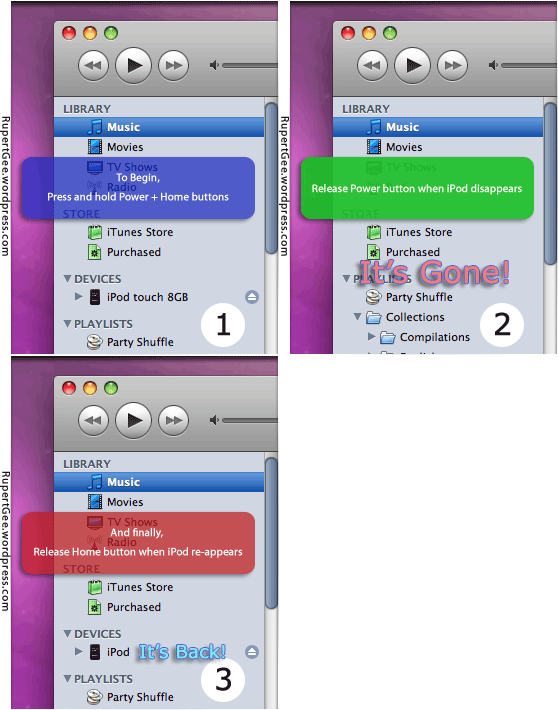
  • Put the iPod touch in DFU (Device Firmware Upgrade) Mode as follows:
  • Press and hold-down both the Power and Home buttons.
  • Release the Power button when you see the iPod disconnects and disappears from iTunes. This takes place in about 10 seconds. The iPod’s screen is blank.
  • Release the Home button when you see the iPod re-connects and re-appears in iTunes. Again this happens in about 10 seconds. The screen is still blank until the iPod reconnects.
  • It’s good to go!
  • Now you can do the usual restore firmware procedure with Option+Restore (Shift+Restore in PC), and subsequently jailbreak your iPod touch once again.


To use iTunes 7.5 or 7.6? Both versions will get your iPod touch downgraded to firmware 1.1.1. However, version 7.6 breaks the “OktoPrep” hack. That means your iPod touch can only be jailbroken to version 1.1.1 after you installed AppSnap. iTunes version 7.5 is therefore preferred as it does not interfere with “OktoPrep” and you will be able to upgrade to version 1.1.2 firmware. Thanks to Berzerker for this tip!

Sunday, December 2, 2007

[HOW TO] - GUIDE: 1.1.1 to Jailbreak 1.1.2

This is the BEST resource which I have successfully Jailbroken my iPod Touch to 1.1.2

--> GUIDE: 1.1.1 to Jailbroken 1.1.2

[HOW-TO] - Easy iPod touch iPhone Jailbreak Takes Less than 10 Seconds

[HOW TO] - Jailbreak to 1.1.2

A crew of hackers (including hdm/metasploit, rezn, dinopio, drudge, kroo, pumpkin, davidc, dunham, and NerveGas) have introduced a one-touch instant jailbreak for both iPhone and iPod touch. The jailbreak opens your iPhone for full disk access and installs Installer.app so you can add pretty much any third party application you like.

Please follow these steps exactly:

1. open iTunes
-plug the iPod into the computer
-hold both sleep/wake and home button until iPod restarts.
-let go of of the sleep/wake button when you see Apple logo.
-continue to hold home button until iTunes pops up with recovery mode
-click yes, and your iPod will be restored to its factory settings.

2. Now if you are restored to 1.1.1, move on to step 4

3. If not, and you are on 1.1.2 then Restore your Touch by pressing and holding the ‘Shift’ key on windows or ‘option’ key on Mac, then click ‘restore’ to select the 1.1.1 firmware file you downloaded earlier. (Find it using google or on this site)

4. Jailbreaking on iPod Touch

To use it, open Safari and point your browser to jailbreakme.com (which we aren't linking to so folks won't install this by accident, but you are prompted to confirm). Once there, read the directions, scroll to the bottom, and tap Install AppSnapp. If Safari disappears and you return to the main Home screen, you're good. Just wait a minute more for your unit to restart--don't touch anything until you see the slide to unlock screen. If Safari hangs, just quit out (press and hold Home for 4-8 seconds) and try again.

Launch Safari

Visit http://jailbreakme.com, Scroll down to the bottom, click "Install AppSnapp". Safari will exit and you'll return to your springboard. Slide to unlock, you are now jailbroken. and are able to use Installer.app.

Prepare your 1.1.1 device for the Update

Launch Installer.app

Scroll down to Tweaks (1.1.1)

Select OktoPrep

Click Install

Update to 1.1.2

1. Connect your device to your computer

2. Launch iTunes

3. Choose your device

4. Click Update

DO NOT CLICK OR SHIFT-CLICK RESTORE: That will wipe the changes OktoPrep made.

1. Close iTunes

Download from here:http://conceitedsoftware.com/iphone/site/112jb.html

2. Connect your device to your computer

3. On Windows, double click on windows.bat, on Mac, double click on jailbreak.jar

4. Follow the on screen instructions.

[HOW TO] - Jailbreak your iPod Touch on a Mac-look VD for 1.1.2

[How To] - Downgrade from 1.1.2 to 1.1.1 on Ipod Touch/Iphone

1. Download the 1.1.1 firmware from here , and save to your desktop.
2. Once that is done, start iTunes.
3. Go to you ipod's tab on the left panel
4. Hold shift and click on the restore button.
5. This will open up a box. Select the 1.1.1 firmware from your desktop and press ok.
6. Your ipod should start restoring.

If it still restores to 1.1.2, or you don't understand this at all, go to this video:

ShareThis

Related Posts Plugin for WordPress, Blogger...