These are instructions on how to enable a firmware downgrade on your iPhone using a Cydia stored SHSH and Mac.

FREE iPod Touch / iPhone 3G / iPhone 3GS / Apple TV TIPS & TRICKS. Its easy to forget the tips you find from the Internet. Thus, one of the way is to keep the important tips that I always used in my Blog. It will also help some of the people who faced similar problems.
Showing posts with label downgrade. Show all posts
Showing posts with label downgrade. Show all posts
Wednesday, February 17, 2010


Saturday, September 6, 2008
[HOW TO] - Get iPhone EDGE & iPhone 3G Firmwares
Firmware Files
Firmware files are quite difficult to obtain for some users, so there is a site that hosts them for easy access. Here are the links for the corresponding files:
Note: These are not firmware files from a Torrent or any other site [unsafe]. These firmware files are downloaded directly from Apple's website and are therefore safe. There is no need to change the extension as these files come directly from Apple in the .ipsw file format.
1st Gen iPhone [iPhone EDGE]
1.0.0 - Click me
1.0.1 - Click me
1.0.2 - Click me
1.1.1 - Click me
1.1.2 - Click me
1.1.3 - Click me
1.1.4 - Click me
2.0.0 - Click me
2.0.1 - Click me
2.0.2 - Click me
2nd Gen iPhone [iPhone 3G]
2.0.0 - Click me
2.0.1 - Click me
2.0.2 - Click me
Firmware files are quite difficult to obtain for some users, so there is a site that hosts them for easy access. Here are the links for the corresponding files:
Note: These are not firmware files from a Torrent or any other site [unsafe]. These firmware files are downloaded directly from Apple's website and are therefore safe. There is no need to change the extension as these files come directly from Apple in the .ipsw file format.
1st Gen iPhone [iPhone EDGE]
1.0.0 - Click me
1.0.1 - Click me
1.0.2 - Click me
1.1.1 - Click me
1.1.2 - Click me
1.1.3 - Click me
1.1.4 - Click me
2.0.0 - Click me
2.0.1 - Click me
2.0.2 - Click me
2nd Gen iPhone [iPhone 3G]
2.0.0 - Click me
2.0.1 - Click me
2.0.2 - Click me
Saturday, January 19, 2008
[HOW-TO] - Downgrade Firmware 1.1.3 to 1.1.1
The day when iTunes prompt me to upgrade to 1.1.3, I hesitated coz I don't want to brick my Jailbroken iPod Touch 1.1.2. I quickly read through the iPod Touch Fans Forum and true enough it will brick the Jailbroke iPod Touch and iPhone. In order to Jailbreak it again, the owner needs to go back to the original Firmware 1.1.1 which at first found to be very difficult.
Here's some of the resources which I found that will help to downgrade to 1.1.1:-
1 - iPodTouchMaster Website
2 - World’s Easiest Method to Downgrade the iPod touch from 1.1.3 to 1.1.1!
Thanks to the original sources above... Let me copy the contents from the Source (2) for ease of reading.
Here’s the world’s easiest method to downgrade your iPod touch from 1.1.3 back to 1.1.1, as first reported by our blog reader, James.
Here’s the world’s easiest method to downgrade your iPod touch from 1.1.3 back to 1.1.1, as first reported by our blog reader, James.
- Connect your iPod touch to your running iTunes (version 7.5 is preferred). Make sure it shows up in iTunes.
- Make sure your iPod is showing its 1.1.3 home screen (it’s not in Recovery Mode.)
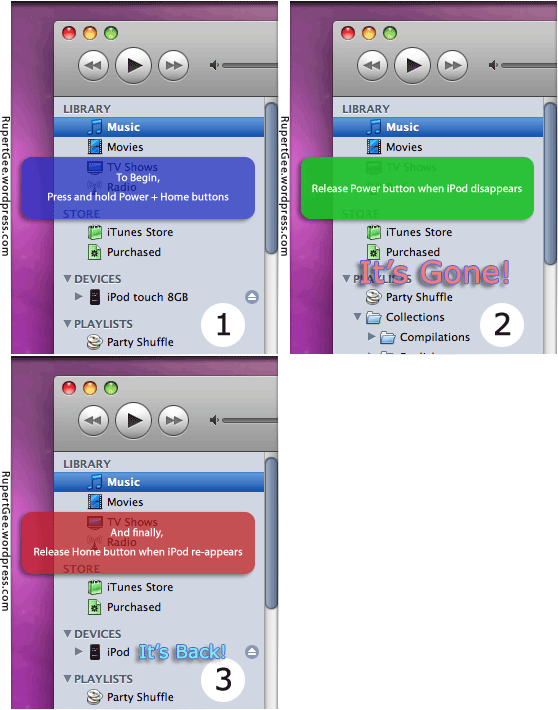
- Put the iPod touch in DFU (Device Firmware Upgrade) Mode as follows:
- Press and hold-down both the Power and Home buttons.
- Release the Power button when you see the iPod disconnects and disappears from iTunes. This takes place in about 10 seconds. The iPod’s screen is blank.
- Release the Home button when you see the iPod re-connects and re-appears in iTunes. Again this happens in about 10 seconds. The screen is still blank until the iPod reconnects.
- It’s good to go!
- Now you can do the usual restore firmware procedure with Option+Restore (Shift+Restore in PC), and subsequently jailbreak your iPod touch once again.
To use iTunes 7.5 or 7.6? Both versions will get your iPod touch downgraded to firmware 1.1.1. However, version 7.6 breaks the “OktoPrep” hack. That means your iPod touch can only be jailbroken to version 1.1.1 after you installed AppSnap. iTunes version 7.5 is therefore preferred as it does not interfere with “OktoPrep” and you will be able to upgrade to version 1.1.2 firmware. Thanks to Berzerker for this tip!
Sunday, December 2, 2007
[How To] - Downgrade from 1.1.2 to 1.1.1 on Ipod Touch/Iphone
1. Download the 1.1.1 firmware from here , and save to your desktop.
2. Once that is done, start iTunes.
3. Go to you ipod's tab on the left panel
4. Hold shift and click on the restore button.
5. This will open up a box. Select the 1.1.1 firmware from your desktop and press ok.
6. Your ipod should start restoring.
If it still restores to 1.1.2, or you don't understand this at all, go to this video:
2. Once that is done, start iTunes.
3. Go to you ipod's tab on the left panel
4. Hold shift and click on the restore button.
5. This will open up a box. Select the 1.1.1 firmware from your desktop and press ok.
6. Your ipod should start restoring.
If it still restores to 1.1.2, or you don't understand this at all, go to this video:
Subscribe to:
Posts (Atom)
